Discover Classes. Earn 10% Rewards.

Adobe Photoshop Level I

Learn Adobe Photoshop in this two-day introductory class. Build a solid foundation in Adobe Photoshop with an overview of the workspace, tools, project planning, basic photo correction, retouching, and restoration, layers and masking techniques, and more.

  • Beginner
  • 16 and older
  • Earn 10% Rewards
  • Price Lock

    Secure your booking now and we'll match any price drop within 48 hours across all booking platforms, ensuring you never miss out on savings!

  • 119 W 23rd St, New York, NY
  • 16 hours over 2 sessions

Express Checkout – $1,095


Proceed to Checkout

No Booking Fees. Lowest Price Guaranteed. Earn 10% Rewards.

Give as a Gift

Start Dates (4) $1,095/person

Show all 2 sessions
  • Sat, Sep 26 at 10:00am - 6:00pm
  • Sun, Sep 27 at 10:00am - 6:00pm
6 left
Book
Show all 2 sessions
  • Sat, Nov 14 at 10:00am - 6:00pm
  • Sun, Nov 15 at 10:00am - 6:00pm
6 left
Book
Show all 2 sessions
  • Sat, Dec 12 at 10:00am - 6:00pm
  • Sun, Dec 13 at 10:00am - 6:00pm
6 left
Book
Show all 2 sessions
  • Sat, Jan 23 at 10:00am - 6:00pm
  • Sun, Jan 24 at 10:00am - 6:00pm
6 left
Book
Showing 14 of 4

Book a Private Group Event

Booking this class for a group? Find great private group events

Or see all Photoshop Group Events

Explore group events and team building activities ranging from cooking, art, escape rooms, trivia, and more.

Class Description

Description

Adobe Photoshop stands as the industry-standard software application for professional image editing, photo retouching, and graphic manipulation work. This comprehensive two-day introductory course will rapidly bring you up to speed on essential Photoshop skills and workflows. The course begins with a detailed overview of the Photoshop workspace and toolset, then progresses through project planning and professional workflow approaches, basic photo correction techniques, photo retouching and restoration methods, working effectively with layers, implementing professional masking techniques, and utilizing channels for advanced image work.

Course Audience:

This course is designed for professionals and creatives in these roles:

  • Media producers managing visual content
  • Video and photo editors with image manipulation needs
  • Assistant editors working with production teams
  • Motion graphic artists seeking foundational Photoshop knowledge

Course Prerequisite:

  • Learners should have basic working knowledge of the Mac OSX operating system and general computer navigation skills

Comprehensive Course Outline:

Understanding Digital Image Fundamentals

  • Understanding RGB and CMYK color models and how they work (additive and subtractive color principles)
  • Image size versus resolution concepts: understanding the practical differences
  • Pixel aspect ratio concepts: determining whether all pixels are square
  • Bits per channel understanding and practical significance
  • Alpha channel functionality and importance to design and image work

Getting Comfortable with the Photoshop Work Environment

  • Starting and initializing Adobe Photoshop
  • Using Photoshop's extensive tool palette effectively
  • Color sampling and selection techniques
  • Working with tools and adjusting tool-specific properties
  • Undoing and reversing actions in Photoshop
  • Understanding panels and how to customize panel locations
  • Finding and utilizing resources for continued Photoshop learning

Basic Photo Correction Techniques

  • Developing strategic retouching approaches
  • Resolution and image size considerations
  • Opening files efficiently using Adobe Bridge
  • Straightening and cropping images in Photoshop
  • Adjusting color balance and tonal values
  • Using the spot healing brush tool for seamless corrections
  • Applying content-aware patches
  • Repairing image areas with the clone stamp tool
  • Sharpening images for final output

Working with Selections

  • Selecting content and understanding selection tool options
  • Getting started with selection workflows
  • Using the quick selection tool effectively
  • Moving selected areas within images
  • Manipulating and refining selections
  • Using the magic wand tool for color-based selection
  • Selecting with lasso tools for freehand selection
  • Rotating selected content
  • Using the magnetic lasso tool for intelligent edge selection
  • Selecting content from center points
  • Resizing and copying selected areas
  • Cropping images using selection tools

Layer Fundamentals and Techniques

  • Understanding layers and layer organization principles
  • Getting started with layer workflows
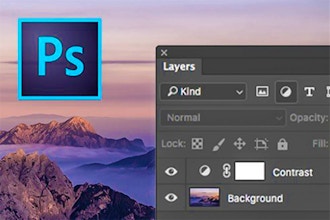
  • Using the Layers panel effectively
  • Rearranging and organizing layer stacks
  • Applying gradients to layers
  • Applying layer styles for visual effects
  • Adding adjustment layers for non-destructive editing
  • Updating and modifying layer effects
  • Adding borders and frames to images
  • Flattening image layers and saving final files

Quick Fix Solutions for Common Image Problems

  • Improving snapshot and photograph quality
  • Creating background blur and depth effects
  • Creating panoramic images from multiple photos
  • Correcting lens distortion and perspective issues
  • Adding and controlling depth of field
  • Moving objects using content-aware move tools
  • Adjusting and correcting perspective in images

Masks and Channels for Advanced Selection

  • Working with masks and channels for precise control
  • Getting started with mask workflows
  • Creating masks for selective editing
  • Refining masks for smooth transitions
  • Creating quick masks for rapid selection
  • Manipulating images using puppet warp features
  • Working with color and alpha channels

Typographic Design in Photoshop

  • Understanding type and text handling
  • Getting started with text workflows
  • Creating clipping masks from text
  • Creating text along custom paths
  • Warping and distorting point type
  • Designing paragraphs and text blocks
  • Adding rounded rectangles and shapes
  • Adding and styling vertical text

Vector Drawing Techniques

  • Understanding bitmap images versus vector graphics
  • Understanding paths and the pen tool
  • Getting started with vector drawing workflows
  • Drawing with the pen tool for precise shapes
  • Working with predefined custom shapes
  • Importing smart objects for flexible graphics
  • Adding color and three-dimensional depth to shapes using layer styles

Saving and Exporting Files

  • Understanding file types and when to use each format
  • Choosing the right file format for the intended use

Important Course Note:

  • The curriculum outlined above represents typical topics and activities covered at this skill level. Your instructor maintains discretion to adjust the lesson plan as needed to meet the specific needs and skill levels of the class participants.
School Notes:

Once you have signed up for this class, please email [email protected] if you are signing up for personal improvement or for business and if the company will be paying for your tuition.

Refund Policy

Any transfers and cancellations require written notification to [email protected]

Rescheduling Policy:

  • Bookings transferred by the customer more than 15 business days before the commencement date of the course will incur no transfer fee.
  • Bookings rescheduled by the customer within 1 to 15 business days of the commencement date of the course will incur a $150 transfer fee.

All transferred courses must be completed within 3 months of the commencement date of the original class.

Cancellation/Exclusion Policy:

  • Cancellations by customers made more than 22 business days before course commencement will incur 5% cancellation fee.
  • Cancellations within 9 to 22 business days of course commencement will incur a 50% cancellation fee
  • Cancellations between 1 and 8 business days will incur a 100% cancellation fee.
  • In the event that a customer cancels a booking for which a transfer has taken place, this will incur a minimum 50% cancellation fee.

All refunds for the Six Week Intensive may take a minimum of 10 business days to process regardless of when the cancellation occurs.

Exclusion of a Student by the school may occur if the student displays behavior deemed inappropriate and/or disruptive to other students and/or school faculty. Student will receive 1 (one) written warning regarding behavior. If the behavior in question is repeated, the Student will be removed from the class with a written explanation of their exclusion. In the event that a Student is removed due to the above-mentioned repetitive and/or disruptive behavior, no tuition fees will be refunded.

In any event where a customer wants to cancel their enrollment and is eligible for a full refund, a 5% processing fee will be deducted from the refund amount.

Reviews of Classes at Manhattan Edit Workshop (97)

(4.7-star rating across 97 reviews)
  • Adobe Photoshop Level I

See reviews for other classes at Manhattan Edit Workshop
loading...
Hide Reviews

Benefits of Booking Through CourseHorse

  • Booking is safe. When you book with us your details are protected by a secure connection.
  • Lowest price guaranteed. Classes on CourseHorse are never marked up.
  • This class will earn you 10950 points. Earn 10% back in reward points!

Similar Classes

Manhattan Edit Workshop

Headquartered in the vibrant Flatiron District of New York City, Manhattan Edit Workshop (MEWShop) was founded in 2002 to provide cutting-edge instruction on Adobe, Avid, Blackmagic, and Apple platforms. Over the years, MEWShop has evolved into a comprehensive training center, offering an ever-expanding curriculum designed to meet the demands of today's media and entertainment industries. Whether you’re an aspiring editor, a seasoned professional looking to refine your skills, or a content creator seeking to expand your production knowledge, MEWShop provides the ideal environment to learn and grow. Our approach to education combines technical mastery with artistic vision, ensuring that students not only understand the tools of the trade but also develop a keen storytelling sense essential to success in the industry.

View school profile
Manhattan Edit Workshop
Vetted by CourseHorse

A verified NYC educator.

Loading...